
Rolling 14-day Forecast
See Your Household Cash Flow Before It Happens
A monthly total can look comfortable while the timing between bills, income and card payments creates pressure. Capehelm’s Forecast turns those dates into a projected checking balance you can inspect day by day.
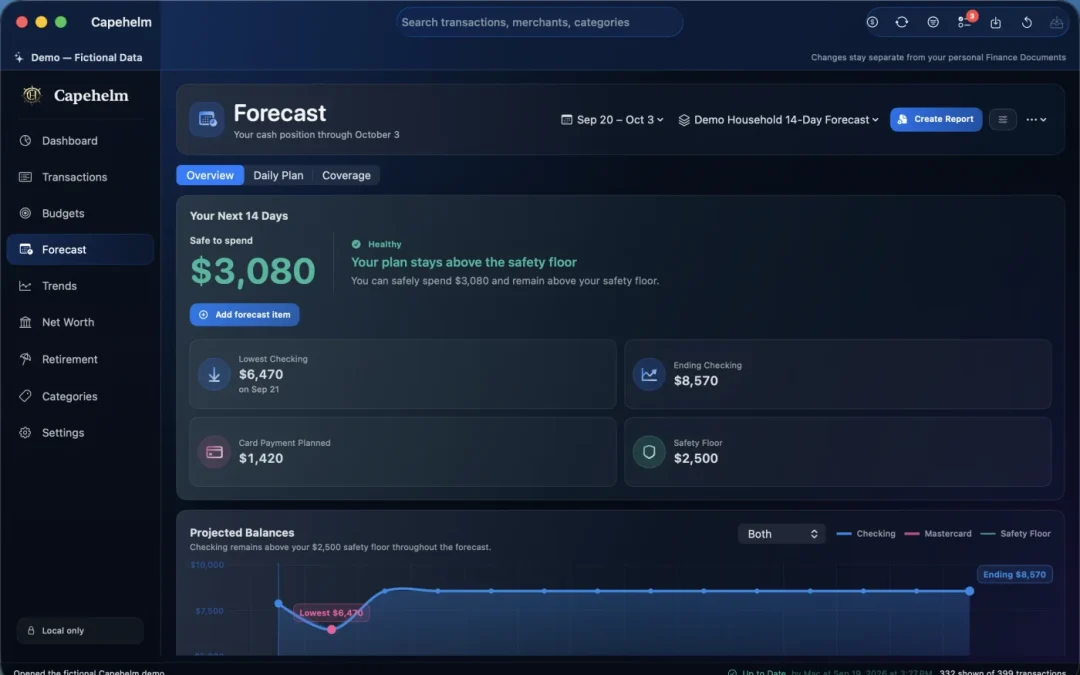
Forecast combines planned items and expected movement into a day-by-day view. Shown with fictional demo data.
How the Forecast works
Turn a list of commitments into a timing plan.
Forecast starts with the balances and items in your Finance Document, then lays expected movement across the next two weeks.
Start with checking.
Set the balance you want to plan from and see how each day’s expected income and spending changes the projected path.
Add what is expected.
Schedule recurring commitments and add manual items for one-off expenses, income or transfers that belong in the window.
Inspect the low point.
See the lowest projected balance, ending balance and days that may fall below the safety floor you use for planning.
Work day by day.
Select a date to review its items, adjust the plan and understand which movement produces the change on the chart.
Capehelm does not automatically discover every future bill. Forecast is a planning workspace: you decide which recurring and manual items should be included.
Two useful questions
Budget and Forecast solve different parts of the month.
“How much do I plan to spend?”
A budget sets monthly expectations by group and Category, compares actual spending with the plan and shows where the month may be heading.
- Monthly targets
- Plan versus actual
- Projected month end
“When will money move?”
A cash-flow forecast focuses on timing. It combines upcoming income and expenses to estimate what checking may look like on each day.
- Dates and commitments
- Projected low points
- 14-day balance path
Together, Budget helps you decide what the month should contain while Forecast helps you see whether the timing of that plan may create pressure before the next deposit arrives.
Forecast Coverage
Compare what you expected with what actually happened.
After transactions are imported, Forecast Coverage helps you review whether planned items appear to have been covered by real transactions. It keeps the plan connected to the record without pretending the match is a live bank feed.
You can inspect completed periods, review matching context and resolve items that need attention. The comparison is performed from information in your local Finance Document.
See how transactions enter CapehelmUpcoming bills and income
A useful forecast depends on useful inputs.
Recurring items keep regular commitments visible beside expected income. Manual items cover the things that are real but not part of a repeating schedule—an appointment, a reimbursement or a one-time purchase.
Because Capehelm does not connect to billers or bank accounts, you remain responsible for keeping those expected items current. That control is also what lets the Forecast reflect your household plan rather than a service’s guess.
Plan the timing, not just the total
Know what the next two weeks may ask of your checking account.
Capehelm is available on the Mac App Store, with a rolling 14-day Forecast alongside Budget, Trends and the rest of your local financial picture.