
A serious finance workspace for macOS
Personal Finance Software Built for Mac
Capehelm brings day-to-day spending, monthly planning, short-term cash flow and long-term financial context into a native Mac application. Your work begins with a Finance Document you control—not a browser account holding your financial life.
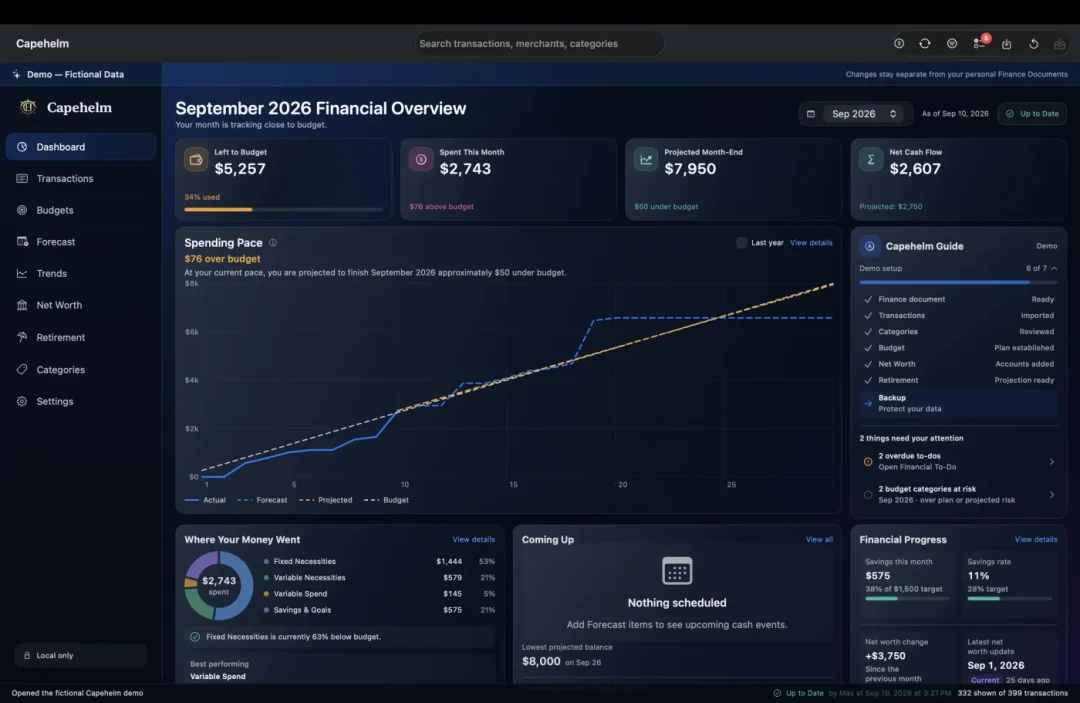
The Dashboard brings the current month, what needs attention and the next useful step into one Mac workspace. Shown with fictional demo data.
Designed around the way you work
A Mac workspace, not another finance tab.
Capehelm is designed as a focused macOS application for people who prefer to manage important files and decisions on their Mac. The interface keeps detailed financial work—from reviewing a transaction to adjusting a retirement assumption—inside one consistent workspace.
That does not mean everything happens automatically. You choose the statements you import, review how the information is organized and decide where your Finance Document and backups live. Capehelm provides structure without taking ownership of the underlying financial files.
One Finance Document
A simple model for a connected financial picture.
Your Finance Document is the foundation. It keeps the transactions, Categories, plans and analysis that belong together in a local file you control.
- 01
Create or open
Choose the Finance Document that will hold your financial workspace.
- 02
Import statements
Bring in the local CSV files you choose—without connecting Capehelm to your bank.
- 03
Review and organize
Confirm transactions and Categories, then keep reusable merchant rules with the document.
- 04
Build the picture
Use that reviewed history for budgeting, Forecast context, Trends and household reports.
More than transaction history
Past, present and future have different jobs.
Understand what happened.
Transactions and Trends help you examine merchants, Categories and changes over time. Review the details behind a total instead of treating history as a static list.
Decide what this month needs.
Budget compares your plan with actual and projected spending. Dashboard keeps the most useful current signals together so you can see what is on track and what deserves attention.
Look beyond today.
Forecast looks ahead 14 days. Net Worth connects assets and liabilities, while Retirement models how included accounts may grow from contributions and assumptions over time.
Reports connect the conversation. Weekly and month-end PDF check-ins turn the same local financial picture into something a household can review together.
A deliberate fit
Who Capehelm may suit.
Capehelm is a strong fit when you want a structured financial workspace but still want direct control over how information enters it and where it lives.
- You prefer doing detailed financial work on a Mac.
- You are comfortable downloading statement CSV files from your financial institutions.
- You want more connected analysis than a collection of spreadsheets.
- You value local Finance Documents, local backups and user-chosen storage.
- You want historical review, monthly planning and forward-looking cash flow in one place.
Capehelm for Mac
Bring the whole financial picture onto your Mac.
Capehelm is available on the Mac App Store. Bring budgeting, forecasting, spending analysis and long-term planning together on your Mac.